





What Is Variable Data Labeling in Print & Apply Systems?
Variable data labeling in print & apply systems is the process of generating and applying unique labels in real time using live data from ERP, MES, or PLC systems.
These labels can include batch codes, serial numbers, expiration dates, shipping information, or pallet IDs. In automated production environments, each label must match the correct product, carton, or shipment.
This guide explains how print & apply systems handle variable data, how to connect data sources, and how to choose the right system for accurate and reliable labeling.
How Print & Apply Systems Handle Variable Data Labels (Step-by-Step)
In factories and warehouses, print & apply systems are widely used to automate labeling. These systems combine a print engine and an applicator to print variable data barcode labels and apply them to products, cartons, or pallets in one continuous process.
The print engine generates each label using live data from systems such as PLCs, ERP platforms, or databases, while the applicator (tamp, blow, or wipe-on arm) places the label accurately on moving items without manual handling.
For more on variable data labels, see What Are Variable Data Labels and How to Print Them.
In most production environments, this process follows four steps: data input, template mapping, real-time printing and application, and verification.
Step 1: Get Data from PLC, ERP, MES, or Database
The process starts with a live data source. This data may come from a PLC, ERP system, MES platform, database, Excel file, API, or scale. The system pulls the required label information before printing starts.
At this stage, the goal is simple: make sure the printer—typically an industrial label printer—receives the correct data for the correct item. If the data is incomplete, delayed, or mismatched, the system may print the wrong label.
Step 2: Fill Data into the Label Template
Once the data is received, the system places each value into the correct field in the label template. For example, one field may contain a batch number, another a production date, and another a barcode or QR code.
This step keeps the label format consistent while allowing the content to change. In variable data label printing, good template control prevents errors. Poor mapping can lead to wrong codes, incorrect dates, or shipping mistakes.
Step 3: Print and Apply the Label in Real Time
After the template is ready, the system prints and applies the label automatically. A PLC or sensor usually triggers this step when the product or carton reaches the correct position.
This is where real-time labeling happens. The system must process data quickly, print clearly, and apply the label at the right moment. If timing is off, even correct data may end up on the wrong item.
Step 4: Verify the Label and Store the Record
After the label is applied, the system verifies the result, which may include barcode scanning or visual inspection. Some operations also store a print log or job record for traceability.
This final step helps companies reduce errors and improve process control. It is especially important in applications that require barcode readability, shipment accuracy, or audit records.
In short, print & apply systems handle variable data by turning live data into accurate labels in real time. This ensures each product, carton, or pallet is labeled correctly.
How to Connect Variable Data to a Print & Apply System
Different production environments use different data sources. The table below highlights the differences between the most common connection methods.
| Data Source | Typical Use | Main Advantage | Best Fit |
|---|---|---|---|
| API | Real-time data exchange between systems | Flexible integration | Complex production environments |
| PLC | Line trigger and live production data | Fast response | Automated packaging lines |
| Database | Batch records, serial numbers, order data | Structured data control | Traceable labeling workflows |
| Excel / CSV | Simple job lists or offline data import | Easy setup | Low-volume or basic projects |
| Scale / Checkweigher | Weight-based label data | Live measurement input | Food, logistics, and variable-weight products |
In short:
- API integration is ideal when multiple systems (such as ERP, MES, or WMS) need to exchange data with the labeling system in real time
- PLC integration enables precise control by triggering label printing at the exact position of each product or carton
- Database integration supports structured data management, making it suitable for applications that require traceability and record control
- Excel or CSV import is easy to set up but offers limited automation and real-time capability
- Scale or checkweigher integration is used when label content depends on live weight data, especially in food and logistics applications
The best option depends on your production workflow, data structure, and required level of automation.
Variable Data Labeling Applications Across Key Industries
Here's how four key industries leverage real-time variable data labeling:
| Industry | Typical Variable Data | Key Challenges | Benefits of Print & Apply Systems |
|---|---|---|---|
| Food & Beverage | Production date, expiration date, batch number, carton labels | Batch traceability and product recall management | Real-time MES integration enables automatic data updates for each production run, reducing downtime by up to 30% |
| Pharmaceutical & Medical | UDI codes, batch numbers, expiry dates, DataMatrix codes | Strict FDA/GMP compliance with zero tolerance for errors | Serialization and verification ensure 100% barcode readability and reduce recall risks |
| Logistics & Warehousing | SSCC labels, order numbers, routing info, customer addresses | Picking errors and shipment delays | WMS integration automates carton labeling, replacing manual work and improving picking accuracy by up to 25% |
| Manufacturing | Part serial numbers, assembly batches, inspection codes, MES traceability data | Supply chain disruptions and maintenance tracking challenges | Industry 4.0 integration enables full automation from MES to printing and labeling, improving lifecycle visibility |
How to Choose a Print & Apply System for Variable Data Labeling
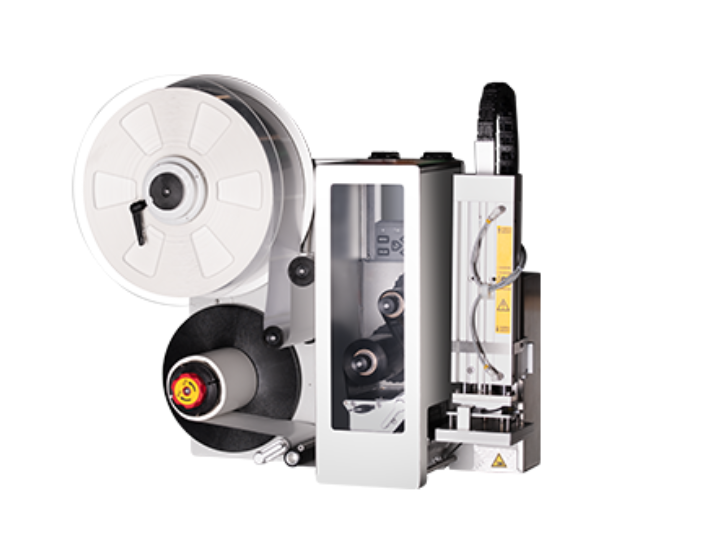
When choosing a print and apply labeling system, focus on four key factors: speed, print quality, integration, and maintenance.
Check System Speed and Line Compatibility
The system must match your production speed. If it cannot keep up, labels may be delayed or applied incorrectly. Always test performance under real conditions.
Check Print Quality and Barcode Readability
Print quality affects scanning and traceability. In variable barcode label printing, unreadable codes can cause major issues. Check clarity, contrast, and consistency.
Check Data Integration Options
Make sure the system connects easily with your existing setup. This may include PLCs, ERP systems, databases, or APIs. Strong integration reduces manual work and improves reliability.
Check Maintenance and Running Cost
Look beyond the initial price. Consider maintenance, spare parts, downtime, and ease of use. A system that is easy to manage will reduce long-term costs.
When choosing a print & apply system for variable data labeling, the key is simple: can it handle live data accurately and reliably in your real production environment?
iDPRT PA4 Series: Top Print & Apply Systems for Variable Data Labeling 2026
Variable data printing and labeling demand precision, speed, and seamless system integration. The iDPRT PA4 Series Print and Apply Label Applicator—powers automated production lines. They deliver real-time ERP/MES/WMS connectivity, ±1mm label accuracy, and robust variable data processing where every second counts.
Today, this variable data print & apply solution is widely used in Europe, North America, Russia, and other regions. It is especially popular in logistics and e-commerce applications, where it has received strong customer feedback for its performance and reliability.
Why Choose iDPRT PA4 Series
Built for Real Production Environments
- ● High reliability and stability for continuous industrial operation, 24/7 continuous operation support for demanding workflows
- ● Supports multiple label formats and sizes, including gap and continuous media
- ● Flexible labeling arms like stroke/blow, swing, and roll applicators for top, side, and corner applications
- ● Multiple print engine options for different production needs
Designed for Variable Data Labeling
- ● Connect to PLC, API, ERP, MES, or database systems for real-time data
- ● Support 1D/2D barcodes (QR, Data Matrix, etc.)
- ● ±1 mm labeling accuracy ensures reliable scanning and traceability
Flexible Integration and Control
- ● Interfaces: USB, RS232, Ethernet, I/O
- ● Compatible with automated production lines and conveyors
Easy Operation and Maintenance
- ● 3.5-inch touch screen for easy operation
- ● Real-time status monitoring and alerts (LED + buzzer alarm system)
- ● Support for continuous operation with minimal downtime
Typical Use Cases
- ● Manufacturing: batch and product labeling
- ● Logistics: carton and pallet labeling
- ● E-commerce: shipping and order labeling
iDPRT PA4 Series: Core Specifications at a Glance
| Parameter | Specification |
|---|---|
| Print Speed | 8 IPS (200 mm/s) |
| Labeling Speed | Up to 30 labels/min |
| Print Resolution | 300 dpi |
| Labeling Accuracy | ±1 mm |
| Memory | 512 MB RAM + 256 MB Flash |
| Max Label Width | 105.6 mm |
| Max Print Length | 1548 mm |
| Label Thickness | 0.06–0.25 mm |
| Continuous Operation | 24/7 continuous operation |
| Industrial Interfaces | Ethernet, RS232, USB, I/O (15-pin) |
| Display & Control | 3.5-inch touchscreen |
| Alarm System | 3-color LED + buzzer |
| Operating Environment | 5–40°C, 20–85% humidity (non-condensing) |
Need Help With Variable Data Labeling?
If your line needs dynamic labels for cartons, cases, or pallets, the right setup depends on more than printer specifications alone. You also need the right data connection, the right application method, and the right level of control.
Need a print & apply labeling solution for your operation? Contact our team for technical advice on system integration, application fit, and industrial labeling workflows.
FAQ
1. What is the difference between variable data printing and standard label printing?
Standard label printing repeats the same content on every label. Variable data printing changes the content from one label to the next. This supports traceability, serialization, shipping accuracy, and product-specific identification.
2. Can a print and apply system connect to a PLC?
Yes. Many companies use a print and apply system with PLC integration for real-time trigger control and synchronized labeling on production lines.
3. What types of data can be printed on variable labels?
Common data includes serial numbers, batch codes, dates, product IDs, order numbers, shipping destinations, pallet IDs, barcodes, and QR codes. These are all common elements in variable data label printing.
4. Is variable data handling suitable for high-speed production lines?
Yes, but the system must support fast data transfer, accurate trigger timing, reliable print performance, and consistent label application. High-speed lines need strong coordination between the data source, printer, and applicator.
5. How can companies reduce variable labeling errors?
Companies can reduce errors by improving field mapping, controlling templates, verifying barcodes, testing under live line conditions, and keeping print records. These steps strengthen variable data handling in print and apply systems.